

Key Takeaways
- Command line accounting has expanded beyond three foundational tools (Ledger, hledger, and Beancount) to include web interfaces and AI agent-first products, which can be mapped across two axes: whether the primary user is human or agent, and whether books are local or cloud-based.
- Desktop ledgers like Ledger, hledger, and Beancount differ in strictness and features; Beancount is most rigorous with investment tracking and cost basis, hledger excels at importing bank data and reporting flexibility, and Ledger prioritizes simplicity and never modifies user files.
- Agent-first tools can catch entries that fail to balance but cannot detect entries that balance while posting to incorrect accounts, so balance-checking provides necessary but incomplete protection against errors.
- Hosted ledgers (Fava, hledger-web, Paisa) layer web interfaces onto existing plain-text tools without replacing them, making books easier to view and edit while maintaining their text-based, auditable nature.
- Agent-run books designed from the start for AI agents, such as beancount.io and Bitwave CLI, represent the emerging direction for shared ledgers where agents perform most bookkeeping work and humans need visibility through shared workspaces.

Until recently, choosing a command line accounting tool meant choosing between Ledger, hledger, and Beancount. Now there are also web interfaces on top of them and a new set of products built for AI agents. Here is my map to make sense of it all.
Two questions sort most of these tools
Is the primary user a human or an agent? And do the books live on one machine or in a shared place? Those two axes give four quadrants:
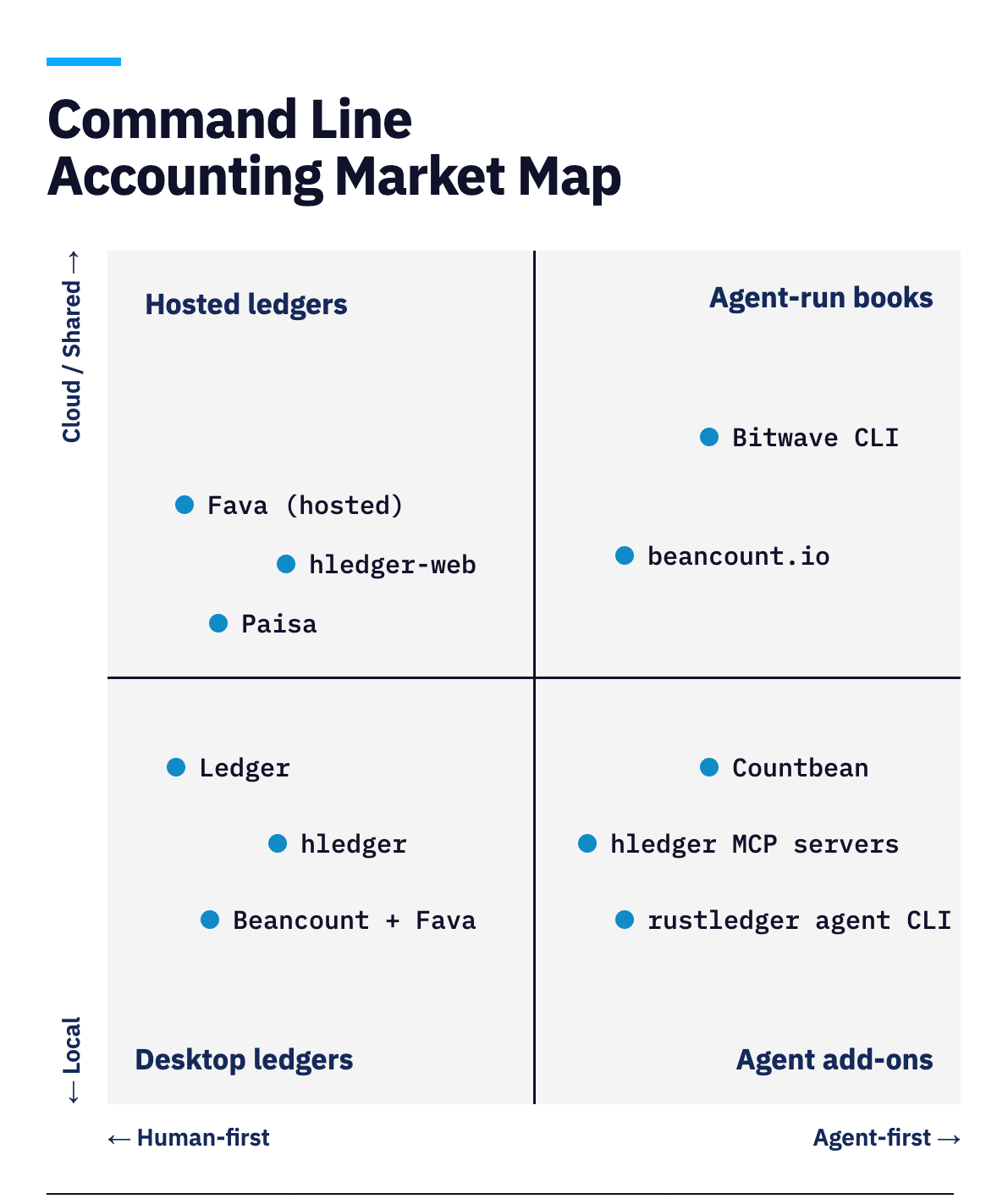
- Desktop ledgers (human-first, local): the classic tools, run from your own terminal.
- Hosted ledgers (human-first, cloud or shared): web interfaces that sit on top of plain text.
- Agent add-ons (agent-first, local): wrappers that let an agent drive an existing engine.
- Agent-run books (agent-first, cloud or shared): tools designed for AI agents to keep the books, with a way to share them.
The placements are my judgment, not a measurement, and the categories blur. Plenty of these tools can sit in two quadrants depending on how you run them.
Desktop ledgers
Desktop ledgers are the tools that started command line accounting, and they share a lineage. Ledger came first, hledger began as a rewrite of it, and Beancount took the same idea in a stricter direction. All three keep your books in plain text files that you own, run on your own machine, and are built for a person typing commands, which is why I group them together. Where they differ is in how strict they are, what they're best at, and how they handle investments.
Ledger
Ledger is the original, created in 2003. It reads one or more plain text files, generates reports from them, and keeps no database or other stored state. It never modifies your data, so your file is always yours to edit.
Ledger is strict about one thing: every entry must balance. If one doesn't, Ledger reports an error instead of producing a report. You run it as ledger followed by options and a command, such as ledger balance or ledger register.
It has no built-in web interface, so it suits people who are comfortable in a terminal and want flexible reports.
hledger
hledger began as a Haskell rewrite of Ledger and has grown into a full set of tools for tracking money, time, or any other commodity. It has three interfaces: the hledger command line, hledger-ui for the terminal, and hledger-web for the browser. hledger-web can run as a local single-user app or as a multi-user app for viewing, adding, and editing entries.
The command line is its strongest part. You can import bank data by pointing it at a CSV file and writing a rules file that tells it how to turn each row into an entry. Once the data is in, you can run reports for balances, registers, balance sheets, income statements, and cash flow, and output them as HTML, CSV, JSON, or SQL.
Beancount
Beancount is the one to choose if you want the tool to double-check your work. Its grammar is strict, and its creator has described it as pessimistic, meaning it assumes you will make mistakes and adds extra checks to catch them.
For example, the default booking method for investments, STRICT, makes you say which lot you're selling whenever it's ambiguous, or you can switch to others such as FIFO or LIFO. Queries use a SQL-like language called BQL.
Beancount's best-known companion is Fava, a web interface that users often cite as a reason to pick Beancount over the alternatives. Beancount suits people who want the strictest checking and who track investments or cost basis.
Hosted ledgers
Hosted ledgers are web interfaces that sit on top of the desktop tools. They don't replace Ledger, hledger, or Beancount. They read the same plain text files and show them in a browser, with charts, reports, and in some cases forms for adding entries. Run one on your own computer and you get a nicer view of your books. Put it on a server and other people can open the same books in their browser.
Fava
Fava is the web interface for Beancount. You start it with a command like fava yourfile.beancount, and it serves your ledger as a local web app with an income statement, balance sheet, trial balance, charts, and a filter bar. It also has a query page for BQL, a built-in editor with auto-completion for account names and payees, and a form for adding transactions that writes the entry into your .beancount file. It is open source under the MIT license.
hledger-web
hledger-web is hledger's browser interface, which the project describes as a simple web UI. It can run as a local single-user app, or as a multi-user app for viewing, adding, and editing entries on the web.
Paisa
Paisa is a personal finance manager with a web UI that sits on top of plain text ledgers, and it reads Ledger, hledger, and Beancount files. It adds a dashboard with net worth, income, and expense charts, portfolio tracking for mutual funds, stocks, and commodities, budget tracking, and analysis of recurring transactions. It stores everything in files rather than an external database, and it is open source under the AGPL-3.0 license.
These interfaces make the books easier to view and, in some cases, to edit. Next are the tools built for AI agents, starting with the ones that plug into the tools above.
Agent add-ons
Agent add-ons are the first wave of tools for AI agents, and they build on the desktop ledgers instead of starting over. An MCP server, a plugin, or an agent-friendly CLI sits between the agent and a ledger engine, so the agent can read reports and add entries while the engine does the accounting.
hledger MCP servers
Several community-built MCP servers connect hledger to AI assistants. One example, iiAtlas's hledger-mcp, is written in TypeScript and supports most hledger commands, so an agent can query balances, generate reports, and add entries. It has a --read-only mode that disables writing entirely, and its author recommends starting there. When writes are enabled, new entries can be dry-run first, and the server makes .bak backups unless you turn that off.
Countbean
Countbean is a Claude Code plugin for hosted plain-text accounting. It keeps a git-backed Beancount ledger, uses AI to turn statements and receipts into validated double-entry, and produces HTML and Excel reports. You install it from inside Claude Code and connect it to a book on app.countbean.com, and it gives the agent 21 tools, including adding transactions, opening accounts, and running BQL queries.
rustledger
rustledger is a Rust rewrite of Beancount that calls itself a drop-in replacement and claims to be 10 to 30 times faster. Its agent features are an MCP server and ag-rledger, a CLI that mirrors the standard rledger commands but returns a single structured JSON envelope per call, so an agent can read results without scraping text.
In all of these, the engine underneath is the same one humans have used for years, and the agent is a guest. That works well as long as the guest behaves. The engine will reject an entry that doesn't balance, which catches a lot. It cannot catch an entry that balances but is wrong, such as the right amount posted to the wrong account. That second kind of error is the one I'd worry about.
Agent-run books
Agent-run books are tools designed for AI agents from the start, instead of adapted to them. They treat the agent as the primary user and build around it: commands that never stop to ask a question, output that a program can parse, and a way to share the books with other people when one human isn't enough. Two tools on my map fit that description:
beancount.io
beancount.io is a workspace for Beancount ledgers that has added bea, a CLI aimed at agents and currently at version 0.1.0. Its local commands for importing, checking, querying, and reporting work on plain text files in a directory you choose and need no account. The hosted pieces are optional: an MCP server, hosted ledgers, and an ask command that answers questions about a ledger through its AI service. It also publishes eight ledger skills that coding agents like Claude Code and Codex can load, and the project is MIT licensed. Its own announcement makes a point I agree with: a passing check proves the ledger balances, not that the agent chose the right account.
As a Bitwave co-founder I'm biased, but Bitwave CLI is the tool I'd point you to if some of your books are going to be kept by an agent. It launched in July 2026 as part of Bitwave's agentic finance push, and it is built on the same premise as this post: an agent's books should be plain text, balance-checked, and auditable. Here is what that means in practice, according to the project's own docs.
Bitwave CLI
As a Bitwave co-founder I'm biased, but Bitwave CLI is the tool I'd point you to if your books are going to be kept by an agent. It’s a free, open-source project on GitHub that makes it easy for your agent to record each expense it incurs, import books you already keep, and answer your questions like how much went to cloud services this month by running reports.
Bitwave CLI keeps your books as plain text files on your own machine, so you can read them, undo anything, and export them to hledger. When a person needs to see them, bitwave migrate moves them to a shared workspace in the Bitwave cloud, and bitwave share --to [email protected] emails that person a link to read them, read-only by default.
For agents that spend money, it adds expense reports you can export as JSON, CSV, HTML, or QIF. For agents that pay in crypto, bitwave wallets send signs the payment and writes the journal entry in the same step, so the books never lag the chain, and bitwave wallets sync pulls on-chain history in as pending entries until the network confirms them. It supports Ethereum and Base today.
Here is the whole loop in five commands: install the CLI, create a set of books, record a $42.18 AWS bill, and read the balances back, first with Bitwave and then with hledger.
brew install bitwave-io/tap/bitwave
bitwave init --name acme-2026

bitwave je new --date 2026-05-29 --payee "AWS" \
  --posting 'Expenses:Cloud $42.18' \
  --posting 'Assets:Checking -$42.18'

bitwave bal
bitwave je export | hledger -f - bal
To try it yourself, start at cli.bitwave.io, browse the code on GitHub, and let me know how it goes for you.
Command line accounting is no longer just for people who like terminals
For about twenty years, command line accounting meant Ledger, hledger, and Beancount: plain text books, kept by people who were comfortable in a terminal. Those tools are mature, and they remain the foundation. The web interfaces on top of them make the books easier to look at, and the add-ons let an agent read and write them. The newest group, built for agents from the start, is where the future is being written.
If the agent will do most of the work and other people need to see the results, agent-run books like beancount.io and Bitwave CLI are the clearest picture of where this is heading.
FAQs About Command Line Accounting Tools
What is command line accounting and what are its main advantages?
Command line accounting involves keeping double-entry books as plain text files and working with them through terminal commands. The main advantages are that books can be stored in version control systems like git to track changes, they're scriptable for automation, and AI agents can be configured to run them.
What are the main differences between Ledger, hledger, and Beancount?
Ledger is the original tool from 2003 that strictly requires entries to balance. hledger is a Haskell rewrite with multiple interfaces (command line, terminal UI, and web) and strong import capabilities. Beancount takes a stricter approach with extra error-checking and is often paired with Fava for a web interface.
Can I use a web interface with my existing plain text accounting files?
Yes, hosted ledgers like Fava, hledger-web, and Paisa sit on top of plain text files and provide web interfaces without replacing the underlying tools. These can run locally on your machine or on a server to allow multiple people to view and edit entries through a browser.
What are agent add-ons and how do they work with AI?
Agent add-ons are tools like hledger MCP servers, Countbean, and rustledger that sit between AI agents and ledger engines, allowing agents to read reports and add entries while the engine handles the accounting. However, the engine can only reject entries that don't balance, not entries that balance but are posted to the wrong account.
What makes agent-run books different from adapting existing tools for AI use?
Agent-run books like beancount.io and Bitwave CLI are designed for AI agents as the primary user from the start, featuring commands that don't require user interaction, machine-parseable output, and built-in ways to share books with other people when needed.


Disclaimer: The information provided in this blog post is for general informational purposes only and should not be construed as tax, accounting, or financial advice. The content is not intended to address the specific needs of any individual or organization, and readers are encouraged to consult with a qualified tax, accounting, or financial professional before making any decisions based on the information provided. The author and the publisher of this blog post disclaim any liability, loss, or risk incurred as a consequence, directly or indirectly, of the use or application of any of the contents herein.