
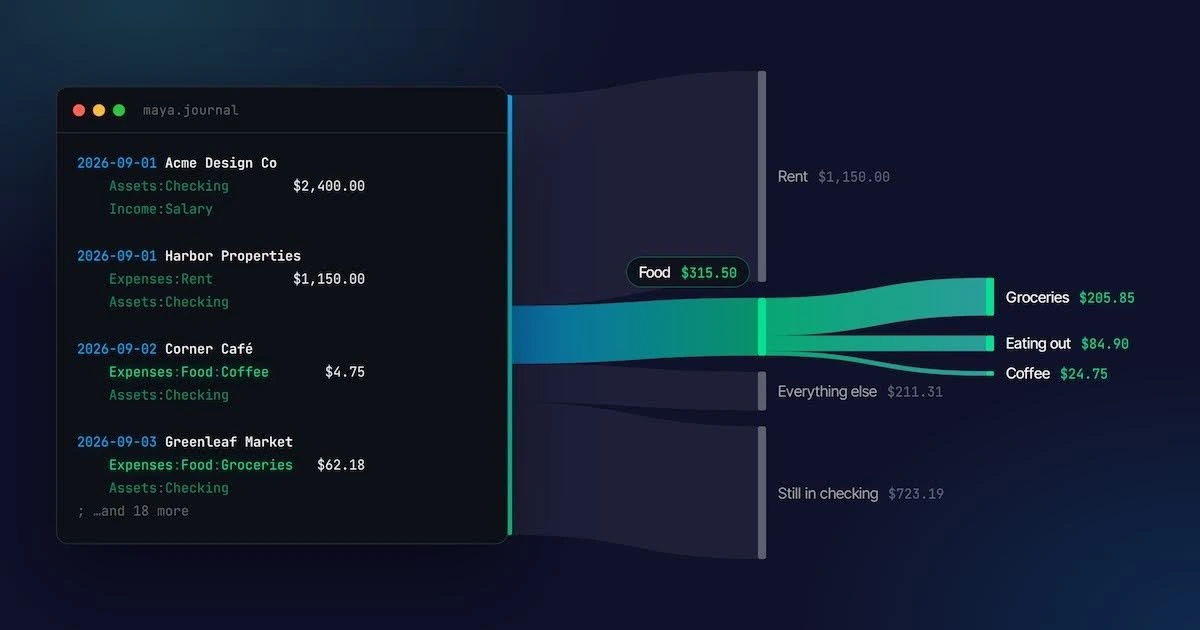
Key Takeaways
- Plain text accounting stores financial records in simple text files organized by date and account, using double-entry bookkeeping where every transaction must balance with money coming from one account and going to another, providing ownership and durability that cloud-based apps cannot offer.
- Bank statements alone cannot answer "what was that?" because they record only that money moved, not the meaning or purpose of each transaction; writing down the meaning in a structured plain text format while memory is fresh is the core of plain text accounting.
- Double-entry bookkeeping's five-hundred-year-old rule that transactions must balance to zero serves as a built-in error check, preventing money from quietly going missing and automatically catching typos or forgotten transactions within a month through balance assertions against bank statements.
- Plain text ledgers enable flexible, retroactive categorization without configuration screens—new expense categories like Expenses:Food:Coffee are created simply by typing them, and historical transactions automatically re-sort and retotal whenever the file changes.
- AI agents managing finances benefit from plain text accounting because they can write ledger entries directly, have errors caught by the balancing rule, and provide humans with auditable, version-controlled records of every financial transaction and decision made.

Nearly every record of your financial life is kept by someone else. Your bank has one record, your card issuer has another, and your budgeting app has a third, stitched together from the first two and a lot of guessing. Each is kept in its own format, for its own reasons. None of them is really yours.
Plain text accounting is the extremely literal fix to all this. You keep your own records, in a text file, in your own words. It sounds almost too simple (and truthfully it is a bit more work than connecting an app) but it's the same double-entry accounting method that businesses have trusted for five centuries, and the file belongs to you in a way no app's data ever will.
This guide is interactive, and it starts with three lines from a hypothetical bank statement and the one question none of the lines can answer.
“What was that?”
Meet Maya. She's a designer, and like most people, she lets her bank keep her financial records for her. Here are three lines from her September statement, newest first, next to what she remembers about each.
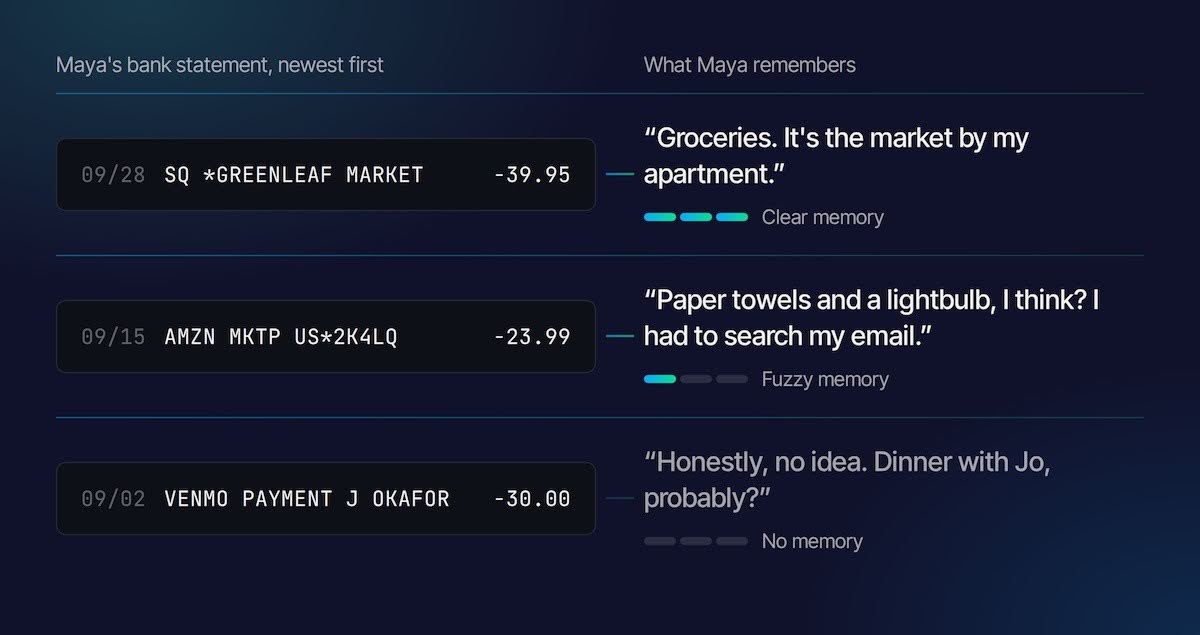
The Greenleaf Market line was last week, and she knows exactly what it was. The Amazon order took a search through her order history. The reason for the Venmo payment at the start of the month is simply gone. It was $30 to her friend Jo, and it was probably dinner, but "probably" is doing a lot of work there.
Notice that nothing in the bank's records got worse over those four weeks. The dates, amounts, and merchant codes are all still perfectly accurate. What faded is the only part the bank never had: what each payment was for. A bank statement records that money moved. The meaning lives in your head, and your head is a bad place to store it.
So the fix is to write the meaning down, once, while you still remember it. That's all plain text accounting really is. The trick is writing it in a format simple enough for you to type and strict enough for software to add up.
The anatomy of a transaction
Maya opens a text editor and creates a file called maya.journal. Here's her first entry:
2026-09-03 Greenleaf Market
    Expenses:Food:Groceries    $62.18
    Assets:Checking
That's a complete accounting record. The first line is a date and a description. The indented lines underneath are called postings, and each one names an account the money touched and, usually, how much. Here, $62.18 went to groceries, and it came out of checking.
The second posting has no amount, and that's on purpose. The software works it out, for reasons that turn out to be the whole trick of accounting. I'll get there in a minute.
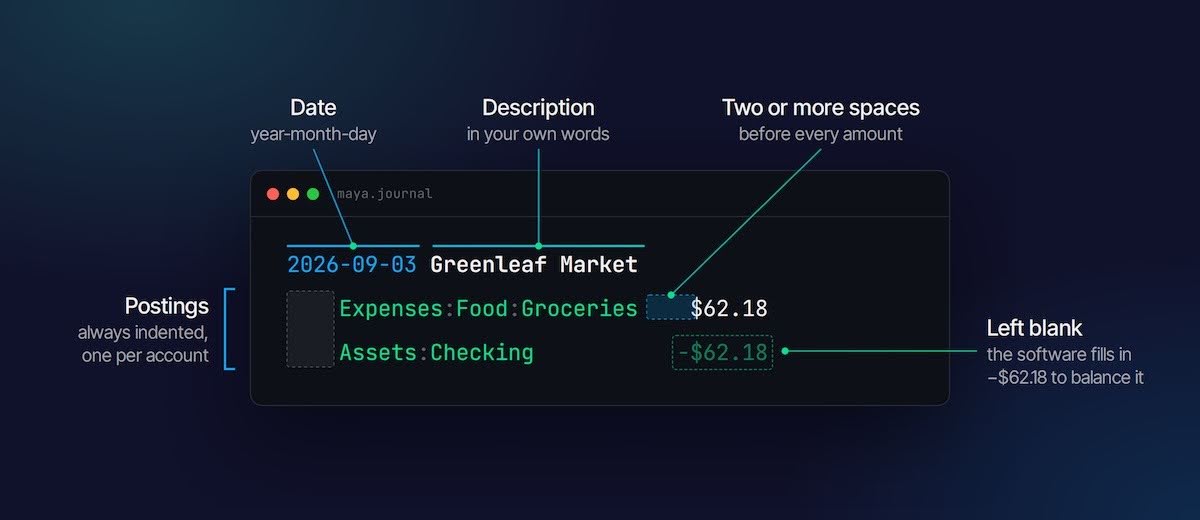
Right now there are really only three syntax rules to remember:
- Postings are indented. The indent is how the software knows those lines belong to the transaction above them.
- Put at least two spaces between an account and its amount. Account names are allowed to contain single spaces, like Expenses:Home Supplies, so two spaces is how the software tells where the name ends.
- Write dates year-month-day. 2026-09-03 looks fussy, but it means the file sorts correctly even as plain text, and nobody has to wonder whether 09/03 means September or March.
Anything after a semicolon is a comment, which is a nice place to leave notes for future you, like
; Jo's birthday dinner, she paid last time.Accounts are just names
Look at Expenses:Food:Groceries again. The colons aren't decoration. They make Groceries a child of Food, and Food a child of Expenses, the way folders sit inside other folders. There's no category menu to configure and no settings screen. If you want a new category, you type one, and it exists.
This is easier to feel than to explain, so here's a slice of Maya's September. Right now everything edible lumps into a single Expenses:Food bucket. Try splitting it.
This is the part people end up loving. Categories stop being a decision you have to get right on day one. Maya can start with Expenses:Food, get curious in March, split it three ways, and her whole history re-sorts itself. That's because the totals were never stored anywhere. They're recomputed from the text every time she asks.
Money always comes from somewhere
Here's the trick we skipped. Every transaction has at least two postings because money never just appears or disappears. It moves from one place to another. When Maya buys a $4.75 coffee, $4.75 lands in Expenses:Food:Coffee, and the same $4.75 leaves Assets:Checking. Written out in full, the entry looks like this:
2026-09-02 Corner Café
    Expenses:Food:Coffee     $4.75
    Assets:Checking         -$4.75
The postings add up to zero. They always have to. That's the entire rule of double-entry bookkeeping, and it's why the software could fill in the blank amount earlier: there's only one number that makes the transaction balance.
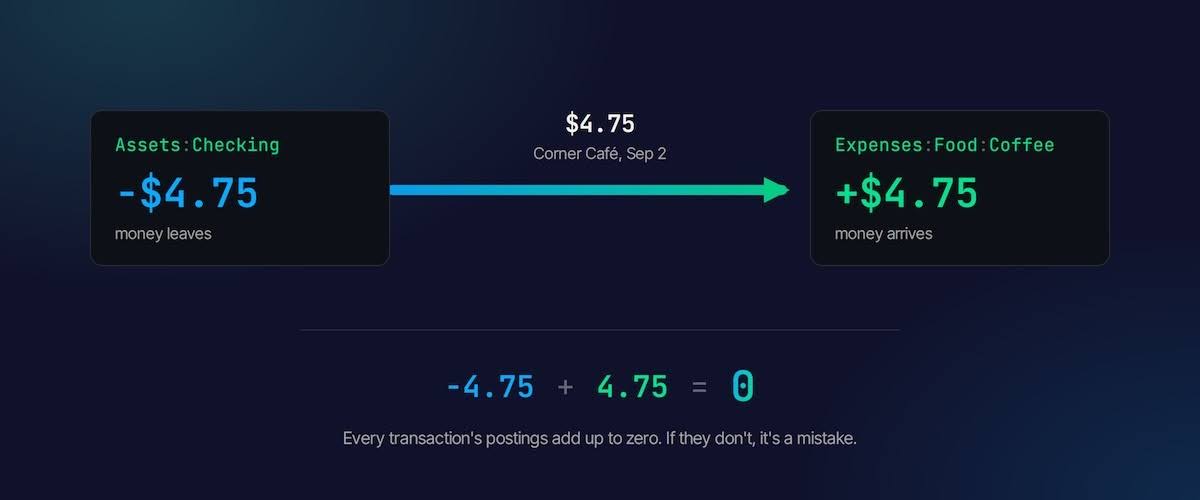
The rule is less fussy than it looks. It's a built-in error check. If Maya types $47.50 on one line and $4.75 on the other, the transaction doesn't balance, and the software refuses to accept it until she fixes it. Money can't quietly go missing in a file where every dollar has to come from somewhere.
Merchants in Renaissance Italy were using this method by the 1400s, and a Franciscan friar named Luca Pacioli wrote it down for everyone in 1494. It has survived more or less unchanged since, which is an unusual record for any technology, let alone one invented before the printing press had really caught on.
The five kinds of accounts
You can name accounts anything, but by convention every account lives under one of five top-level names. Between them they cover every place money can be:
- Assets are what you have: checking, savings, cash in your wallet.
- Liabilities are what you owe: a credit card balance, a student loan.
- Income is where money comes from: a salary, freelance work, interest.
- Expenses are where money goes: rent, food, that Amazon order.
- Equity is the starting point, mostly used once, to record what you already had on the day you started keeping books.
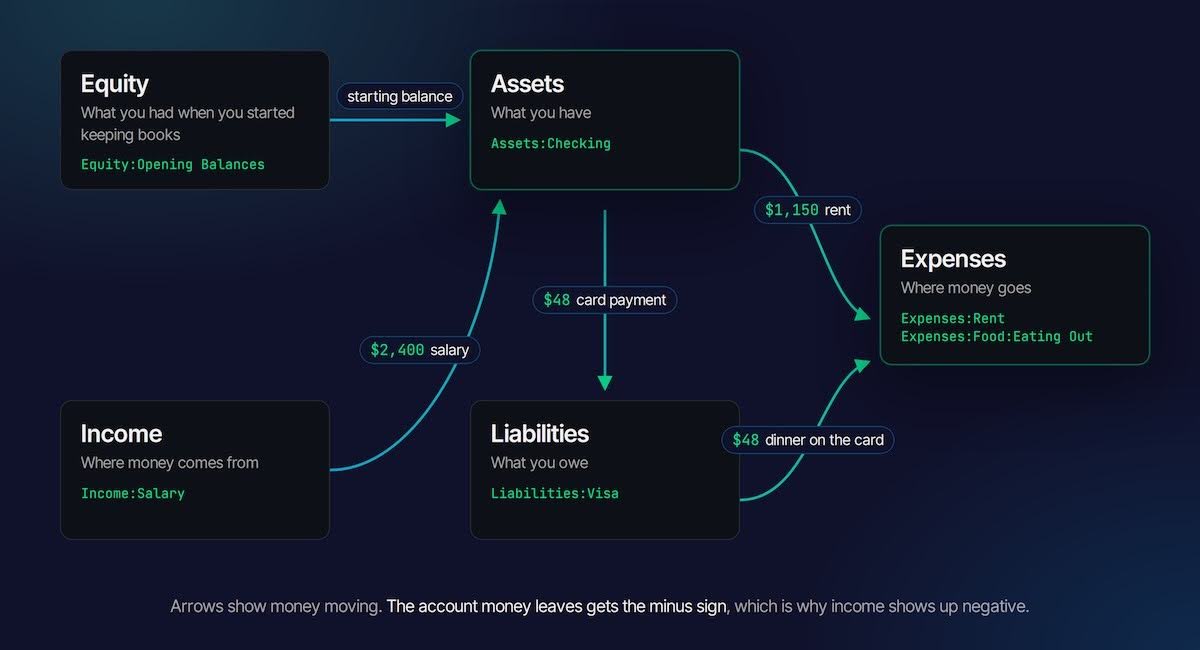
Here's Maya's paycheck, which shows the one part of this that trips up almost everyone:
2026-09-01 Acme Design Co
    Assets:Checking     $2,400.00
    Income:Salary      -$2,400.00
Yes, her income is negative. It feels wrong, but follow the money. The $2,400 left her employer's side of the world and arrived in her checking account. Income:Salary is where the money came from, so it gets the minus sign, just as Assets:Checking did when she bought the coffee. A positive number means money arrived in an account, and a negative number means money left it. Once that clicks, every other sign in the file makes sense.
The practical upshot is that reports show income as a negative number unless you ask them not to. Most tools have a flag that flips the sign for display, so Maya's income statement can say $2,400 like a normal person would.
Credit cards
Credit cards are where most budgeting apps get muddled, and where double-entry quietly shines. Say Maya puts a $48 dinner on her Visa, then pays the card off from checking at the end of the month. That's two transactions:
2026-09-24 Osteria Nove
    Expenses:Food:Eating Out     $48.00
    Liabilities:Visa

2026-09-30 Visa payment
    Liabilities:Visa             $48.00
    Assets:Checking
The first entry is the dinner. Money went to Eating Out, and it came from the Visa, so the card balance goes to −$48, which means she owes $48. The second entry is the payment. Money moved from checking to the card, and the card balance goes back to zero.
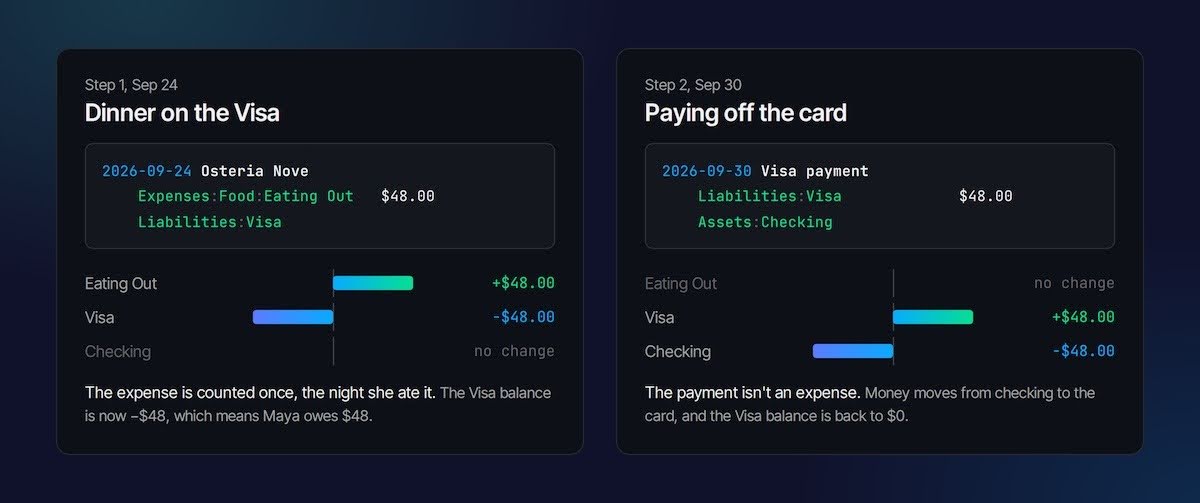
This is where bank statements mislead. To your checking account, that $48 looks like spending on the day you pay the card, not the day you ate. Double-entry records it where it actually happened.
Reports are just views
So far Maya has only written things down. The payoff comes when she asks questions. With hledger, one of the popular free tools, each question is a single short command typed into Terminal (or PowerShell on Windows):
$ hledger bal Expenses:Food --tree
     $315.50  Expenses:Food
      $24.75    Coffee
      $84.90    Eating Out
     $205.85    Groceries
That's Maya's whole September of food, broken down, in under a second. It's also the question her bank statement could never answer, because the statement never knew which payments were food. A few others she might ask:
- hledger bs shows a balance sheet: what she has, what she owes, and the difference.
- hledger is --monthly shows an income statement for each month: money in, money out, and what's left.
- hledger reg coffee shows a register: every coffee she bought, with a running total, which may prompt some reflection.
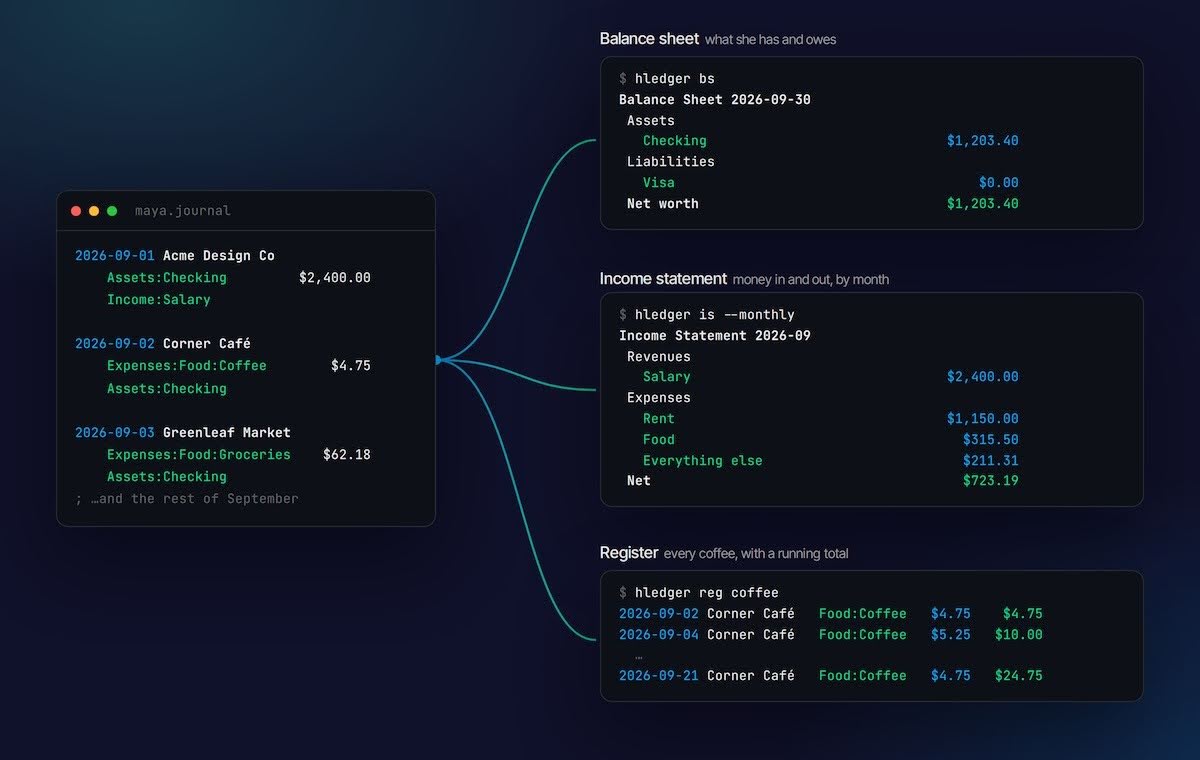
None of these reports are stored anywhere. There's no database to corrupt, no sync to break, and no chance of two reports disagreeing, because every one of them is computed fresh from the same text. When Maya fixes a typo in March, every report for every month that typo touched is fixed too.
Checking against reality
There's an obvious worry with all this. Maya is writing everything down by hand, and people make mistakes. What if she forgets a purchase, or types $54 instead of $45?
The answer is that she doesn't have to trust her own file, because she can check it against the bank. Once a month, she copies the balance from her statement into the file as a balance assertion:
2026-09-30 Statement balance
    Assets:Checking    $0 = $1,203.40
The part after the = is a claim: on this date, checking should hold exactly $1,203.40. Every time a report runs, the software adds up every posting to Assets:Checking and compares. If the numbers match, nothing happens. If they don't, it stops with an error and tells her how far off she is, so a forgotten purchase can't hide for more than a month.
Try it. Maya's file says her checking account should hold $1,248.40, but her bank says $1,203.40.
That's reconciliation, the same check professional accountants run at every month-end close. It's the step budgeting apps usually skip, and it's the reason a plain text ledger can be trusted even though a human typed it.
History for free
Because Maya's books are a text file, she gets something no finance app offers: a complete, readable history of every change she's ever made to them. If she keeps the file in git, the version control system programmers use for code, each edit becomes a small, dated record of exactly what changed.
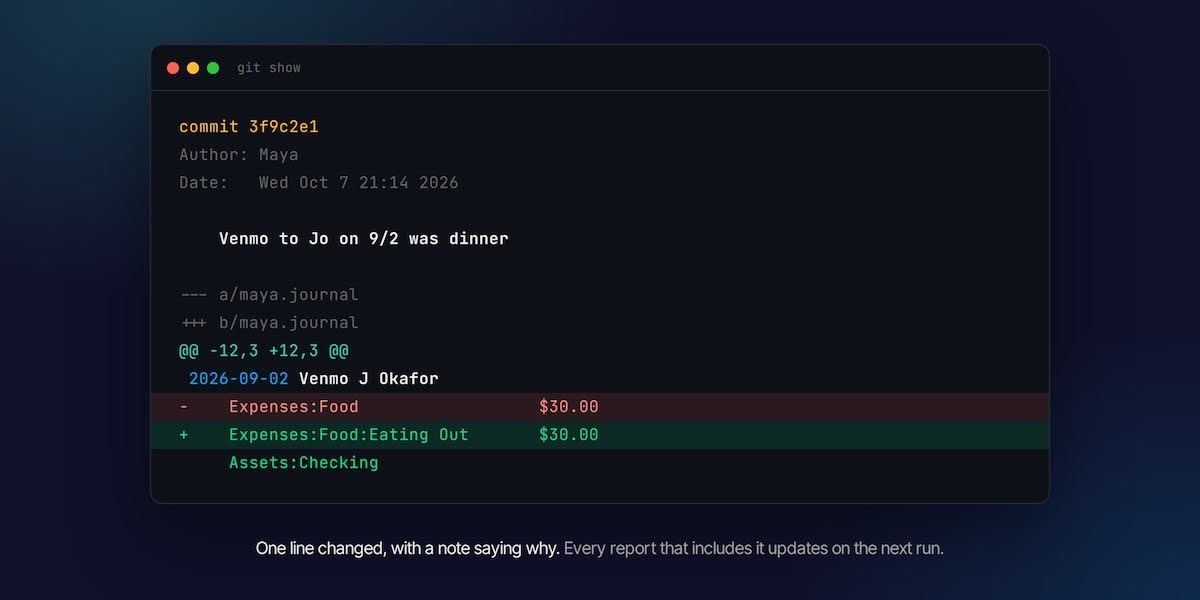
That matters a lot. For example if a number looks wrong in December, Maya can see when it changed, what it used to be, and, if she wrote a decent commit message, why. Accountants call this an audit trail, and companies pay real money for it. Maya gets hers for free.
You don't need git to get most of the benefit, though. The file works just as well in Dropbox, iCloud, or a folder on a USB stick. And because it's plain text, it will still open in thirty years, long after whichever app you'd otherwise have used has been acquired and shut down.
How to get started
Everything in this guide works with free, open-source tools. There are three main ones, and they share the same basic ideas:
- hledger is the friendliest place to start, and it's what this guide's examples use. It has thorough documentation, a built-in web interface, and good tools for importing your bank's CSV exports.
- Beancount is stricter about how files are written, which some people love and others find fussy. Its companion web app, Fava, is the nicest interface of the three. Its syntax is slightly different from what you've seen here.
- Ledger is the original that started the movement. It's fast and powerful, and hledger reads most Ledger files as-is.
The community site plaintextaccounting.org collects tutorials, tools, and the many small scripts people have written around them.
The best advice for a first attempt is to start small. Pick one account, usually checking, and one recent month. Record your opening balance, enter the month's transactions, and add a balance assertion from your statement. If the assertion passes, you've done real double-entry accounting. Everything else, like more accounts, credit cards, and budgets, can be added a month at a time.
Building with agents? Your agents need books too
Everything that makes plain text accounting good for Maya makes it even better for an AI agent. A text ledger is something an agent can read and write directly, with no screen to click through. The balancing rule catches an agent's mistakes the same way it catches hers. And a reconciled, version-controlled file gives the humans overseeing the agent an audit trail they can actually check.
That's the idea behind Bitwave Agentic, and its core is the Bitwave CLI, a command-line accounting interface built for agents. An agent records a journal entry much the way Maya writes one, and the entry has to balance or it's rejected
$ bitwave je new --date 2026-09-30 --payee "AWS" \
    --posting "Expenses:Cloud  $42.18" \
    --posting "Assets:Checking  -$42.18"
With the CLI, an agent can:
- Keep its own books. It can build a lightweight local ledger for a project, produce a balance sheet or profit and loss statement, and pipe the results into hledger or any other plain text tool.
- Report its own spending. Agents increasingly buy data, services, and travel on a company's behalf. The CLI gives them a structured way to file expense reports so that spending still gets categorized, reviewed, and recorded.
- Hand work to a human. Finished books can be shared through Bitwave's hosted app for someone to inspect and approve before anything goes final.
- Work inside Bitwave. For teams already on Bitwave, agents can pull transactions, check balances, categorize activity, and run reports against the real books.
It works with Claude and other agent environments, including KubeClaw, Bitwave's open-source platform for running agents securely in regulated finance teams.
If you're building agents that touch money, install the Bitwave CLI and give them the same thing Maya just learned: books that have to balance, and a record of every change.
FAQs About Plain Text Accounting
How is plain text accounting different from using a budgeting app?
Plain text accounting stores your financial records in a simple text file that you own outright, whereas budgeting apps keep your data on their servers in proprietary formats. With plain text accounting, you retain complete control and portability of your records, and the file will remain readable indefinitely since it's just plain text.
What happens if I make a mistake when entering a transaction?
The double-entry system catches many mistakes automatically—every transaction must balance, meaning money in must equal money out, or the software will reject it. Additionally, you can perform monthly reconciliation by comparing your file against your bank statement to catch any missing or incorrectly recorded transactions.
Do I need special software to use plain text accounting?
You can start with just a text editor to write your ledger file, but free, open-source tools like hledger, Beancount, or Ledger make it much easier to analyze your finances and generate reports from your entries.
Can I reorganize my spending categories later if I want to split them differently?
Yes, one of the key advantages of plain text accounting is that categories can be adjusted at any time without special steps. You simply update the account names (like splitting Expenses:Food into Expenses:Food:Coffee and Expenses:Food:Groceries), and all historical totals recompute automatically since they're calculated fresh from the text each time.
How do I know if my records are accurate?
You can verify accuracy through reconciliation—comparing your file's reported balance against your actual bank statement once a month. If there's a difference, the software will tell you exactly how much is missing, making it possible to locate and add any forgotten transactions before the discrepancy grows.

Disclaimer: The information provided in this blog post is for general informational purposes only and should not be construed as tax, accounting, or financial advice. The content is not intended to address the specific needs of any individual or organization, and readers are encouraged to consult with a qualified tax, accounting, or financial professional before making any decisions based on the information provided. The author and the publisher of this blog post disclaim any liability, loss, or risk incurred as a consequence, directly or indirectly, of the use or application of any of the contents herein.